From scoring to tuning
With the outdoor season beginning, many archers are changing equipment, or buying new shiny things. Archery has been a nice source of retail therapy to me, until I realise that whatever I got means I have to retune everything again. Fast had no tools to help with tuning either.
That changed this week. Two new tuning tools landed, along with some performance work that makes the app feel noticeably snappier. There's also a bit of news about Google Play that I need to talk about, but I'll get to that.
Bare Shaft Tuning
Biggest addition
Bare shaft tuning is a way of diagnosing whether your arrows are matched to your bow. You shoot arrows without fletching alongside your normal arrows, and where the bare shafts land relative to your fletched group tells you what needs adjusting. It's one of the most useful tuning methods out there, and it's surprisingly hard to keep track of on paper.
Fast now has a proper workflow for it. You create a tuning session linked to one of your equipment sets, then run experiments. In each experiment you plot your fletched arrows and bare shafts on a target face. Fletched arrows show as solid dots, bare shafts as hollow ones, so you can see the separation at a glance.
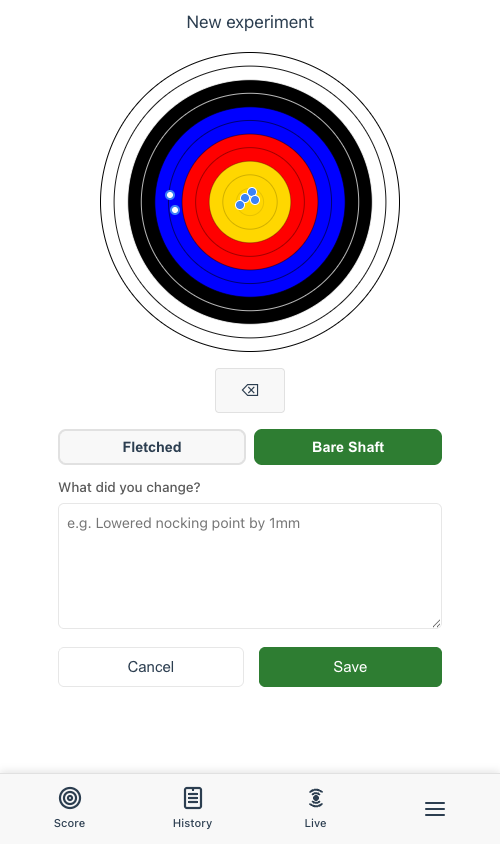
Plotting arrows on the target face. Toggle between fletched and bare shaft to record where each group landed.
Once you've plotted your arrows, the diagnosis wizard asks where the bare shaft group landed relative to the fletched group. You pick a direction on a compass grid, and the app tells you what's going on and what to do about it. "Arrow is too stiff. Increase poundage, use lighter vanes, or switch to weaker-spined arrows." That sort of thing.
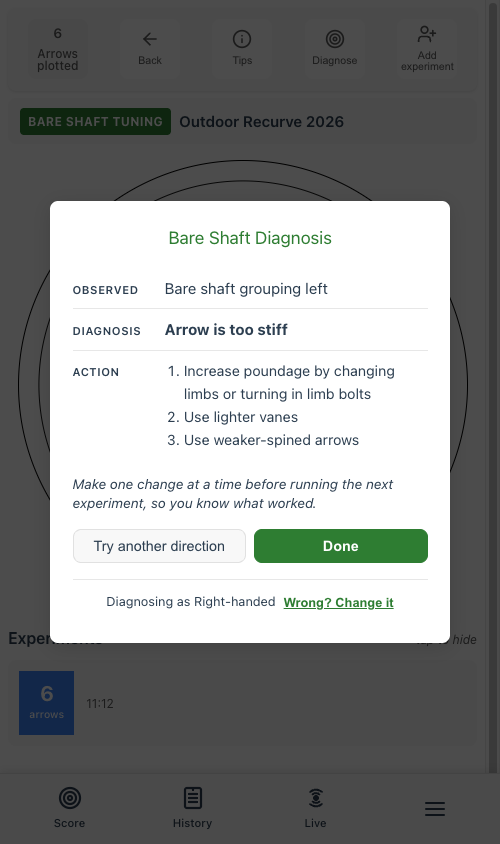
The diagnosis tells you what's wrong and gives you specific actions to try. Make one change at a time, run another experiment, and see if it helped.
The idea is that you keep running experiments, making one adjustment at a time, until the bare shafts land with the fletched group. The session tracks your whole journey so you can see what worked and what didn't.
Full details in the tuning help guide.
Bracing Height Tuning
Bracing height is the distance between the string and the grip. Too high or too low and the bow will be louder, less forgiving, and the arrows won't fly as cleanly. Finding the sweet spot involves shooting groups at different heights and comparing how tight they are.
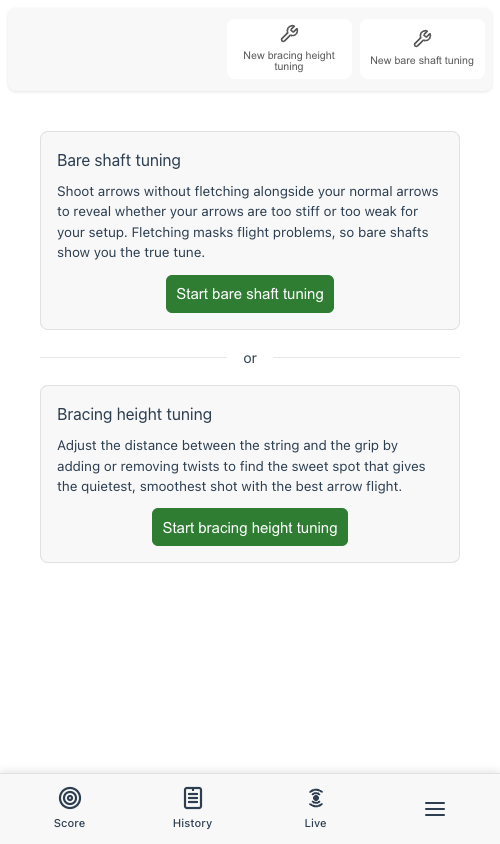
The tuning page with both options. Each session links to an equipment set.
The bracing height tool uses the same experiment workflow as bare shaft tuning. You record a bracing height value with each experiment, plot your arrows, and compare. Each experiment gets its own colour on the target overlay, and you can tap to hide individual experiments to compare two at a time. Once you've found the height that gives the tightest groups, you can update your equipment's bracing height directly from the session page.
More detail in the help guide.
Instant page switching
This one isn't flashy, but you'll feel it. Switching between the Score, History, and Round Selection pages used to reload the page each time. Now the scorecard stays cached in memory, so flipping back and forth is instant. No waiting around. It makes the whole app feel faster, especially mid-shoot when you're checking something in your history and want to get straight back to scoring.
The smaller things that add up
- Finger tab added to the Equipment "Other" section. Another detail you can now track alongside your setup.
Bug fixes
- World Archery score view was broken for Vegas 300 and some multi-distance outdoor metric rounds. Fixed.
- Several tuning UI improvements: better empty state guidance, clearer experiment card styling, and the miss button is now hidden on the tuning target face (you're tuning, not scoring).
A note about Google Play
I submitted Fast to Google Play for production access this week. Google said no. Their reason: not enough people have used the app through the test track to demonstrate that it's ready.
Which is fair enough, but it means I need your help. If you're on Android and you've been using Fast the "old way", as a PWA saved to your home screen, that doesn't count towards Google's usage numbers. The only thing that counts is installing and using the app through the Play Store test track.
So if you have access to the test track and haven't opened the app in a while, please do. And if you don't have access yet, reach out on Facebook and I'll get you set up. Every install and session helps get Fast over the line and into the Play Store proper.
What's next
The tuning features are a first pass. I've built what I think makes sense, but I haven't had the chance to use them for real tuning sessions yet, and I suspect the workflow will need adjusting once people do. That's the point of shipping early.
If something doesn't work the way you'd expect, or you have ideas for how the tuning workflow could be better, let me know on Facebook. Thanks as always to everyone testing.