A theme this week
Fast has always made it easy to share a completed shoot. Tap Share on any shoot and you can fire off the scoresheet image to your coach on WhatsApp, copy a shareable link, or email a signed scoresheet straight to your records officer. The sharing section in the help has the full rundown.
This week, there's a new option in that menu: Share to Golden Records. If your club uses Golden Records, you can push a completed shoot straight into it with a tap of a button. Alongside that, a few smaller bits and a couple of achievement bugs to own up to.
Sharing shoots to Golden Records
Biggest addition
Golden Records is the records-keeping software that a lot of UK clubs use to track their members' scores. If your club uses it, the records officer is the person who types every shoot into it. Every round, every archer, every week. You can probably picture them.
Setup is a one-time thing. Open the You page, expand the Golden Records section, fill in your Golden Records username and password, and tap Verify Connection. Fast looks up your member profile and links it, so you don't have to go digging for an ID. Leave the server address alone unless your club runs its own server.
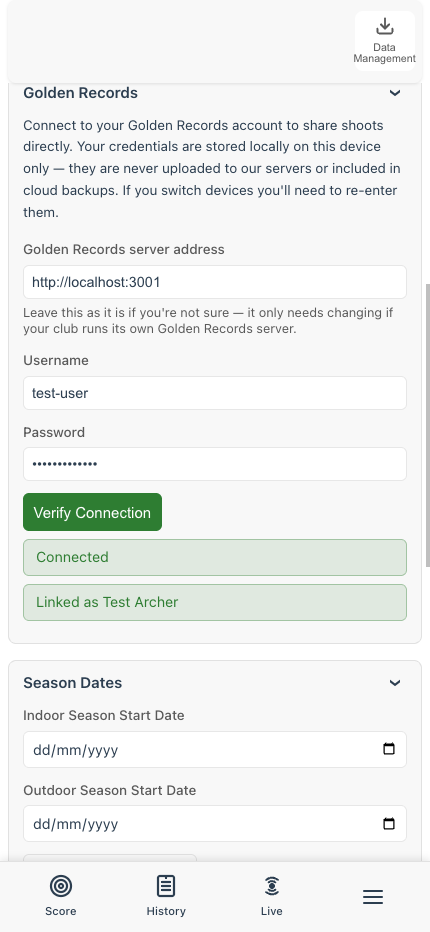
Fill in your login, tap Verify Connection, and Fast finds your Golden Records member and links it.
After that, every completed shoot picks up a new Share to Golden Records option in its Share menu. Tap it. If the round Fast thinks you shot lines up with a round Golden Records knows about, your score goes straight in. Your records officer hears from you before you've packed up.
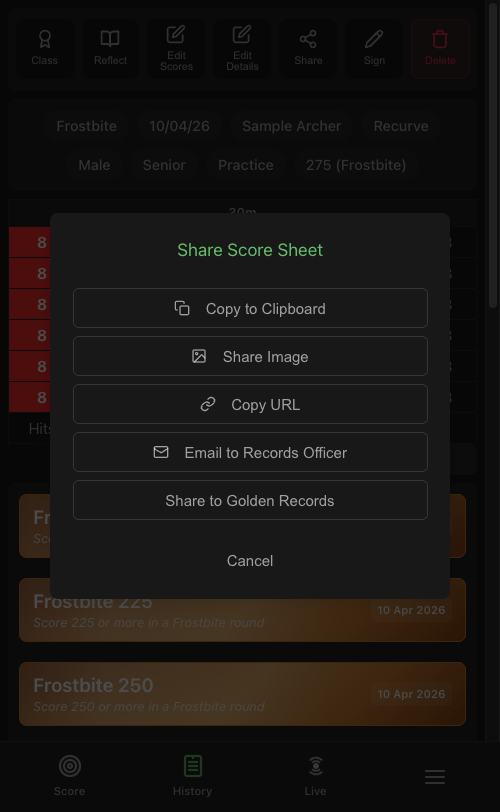
The new option sits in the Share menu alongside the usual image and URL shares.
Your credentials live on your phone and nowhere else. They aren't included in the cloud backup, so if you switch devices you'll re-enter them, but that's the trade for keeping your club login off anyone else's server. More detail in the Golden Records help guide.
When the round names don't quite line up
Fast and Golden Records don't always use the same names for the same round. Fast might call something frostbite, Golden Records has it as Frostbite (30 arrows). Fast's wa 70m is Golden Records' WA 70/720. Fast's western is The Western. They're the same round, just spelled differently.
When Fast can't match automatically, the share flow opens a round picker. Instead of making you scroll through the full Golden Records round list, the most likely matches sit at the top as chips. Tap the right one, confirm, and it's sent.
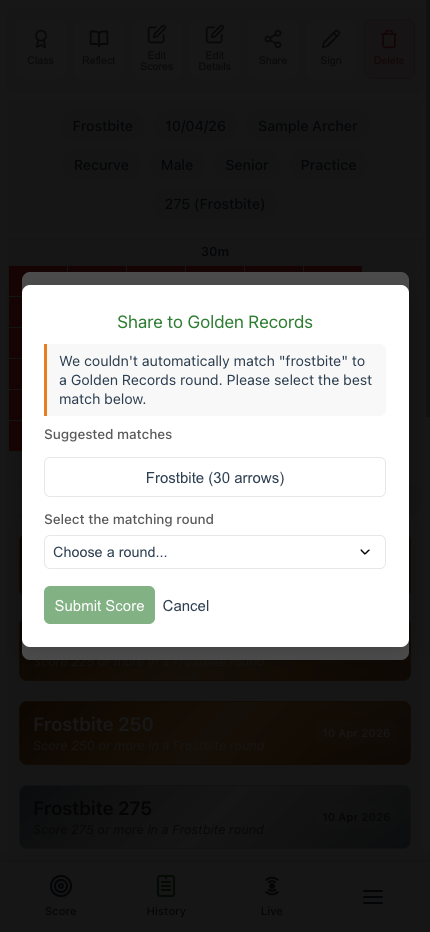
When the name doesn't match exactly, the likely candidates appear as chips above the full list.
Fast won't ever auto-submit on a guess. If it isn't sure, you pick.
The smaller things that add up
- The Share Image button no longer looks like a WhatsApp button. The old green-and-white styling made it look like the button only shared to WhatsApp. In fact, tapping it opens the same built-in share menu your phone uses everywhere else, so you can send the image through any app you already have set up for sharing. Nothing's changed about how it works, the button just now looks like the neutral thing it always was.
- "Using Fast" achievements now survive a restore. If you wiped a phone and restored from the cloud, the achievements in the Using Fast group (Note Taker, Archer's Record, and friends) were re-earnable because Fast was re-earning them. The unlock now stays with you across devices.
- So do your handedness and signature. Both were being quietly dropped on restore, so left-handed archers had to re-set their handedness every time they moved device, and anyone who'd saved a signature was losing it. Apologies. Also fixed.
Bug fixes
- Saving a shoot wasn't unlocking Archer's Record. That achievement is supposed to fire the first time you save a scored shoot, and it hadn't been, because of a storage-key mismatch under the hood. It does now. If you haven't already got it, the next shoot you save should hand it over.
- Worcester rounds were wrongly triggering "Don't Be Blue at 20yd". Worcester uses a different target face where 5 is the centre, not the blue ring, so a perfect end was landing in the blue-ring bucket and lighting up the achievement by accident. Worcester is now excluded from colour-end achievements.
What's next
Fast is still waiting on Google Play production access. Same blocker as a couple of weeks back: Google wants more people using the app through the test track before they'll let it onto the store proper. If you'd like to help with that, send me the Google account email address you'd use on the Play Store and I'll add you. A Facebook message is the easiest way to get it to me.
As ever, if something doesn't work the way you'd expect, or Golden Records isn't matching a round the way you'd want, let me know on Facebook. Thanks to everyone testing.